HOME DOORS SCORES FOR SYSOPS FAQs BBS LIST ABOUT CONTACT
  BBSlink Solar & Terrestrial Data

Synchronet sysops can use a simple Javascript file to allow users to view solar and terrestrial data from N0NBH.

You can display the solar and terrestrial data to your callers without the usual delay encountered when connecting to a door. It is designed to be included in your welcome pages, and simply adding it to your logon.js (see below) will display the wall and invite users to add to it on every connection.

You can also display the graphic above from http://games.bbslink.net/solar.php

  • Place the BBSlink Solar & Terrestrial Data app in your Synchronet BBS 'mods' directory, usually C:\SBBS\MODS or /sbbs/mods and name it solar.js.
  •  
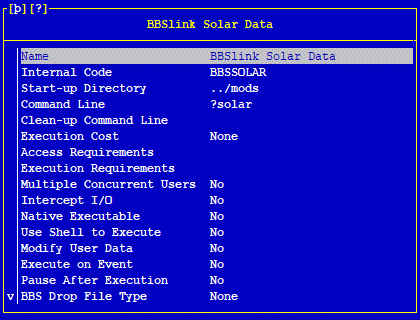
  • Configure a new external program (door) in SCFG that calls the JavaScript connection file so that it canbe run from your external programs menu.

  • Screenshot from SBBS for Linux over SSH
    your view may be different

  • To add the solar data display to your welcome screens at log on, simply add the following line at the end of your logon.js file. This is normally found in /sbbs/exec, but you may wish to copy it to your /sbbs/mods directoty to ensure it doesn't get overwritten on upgrading if you have not modified it already.
        load("solar.js");

Download Script

Return to main sysop page

©2026 BBSlink.net. All Rights Reserved.